
Skip to content
Top 4 Picks
Four picks. One of them is yours.

VistaCreate review

Ten seats for ten dollars, and a licence that can be suspended over an unpaid bill.

BRecommended with a reservation

The verdict

The best money on this page attached to the only licence here that can be taken back after you have used it.

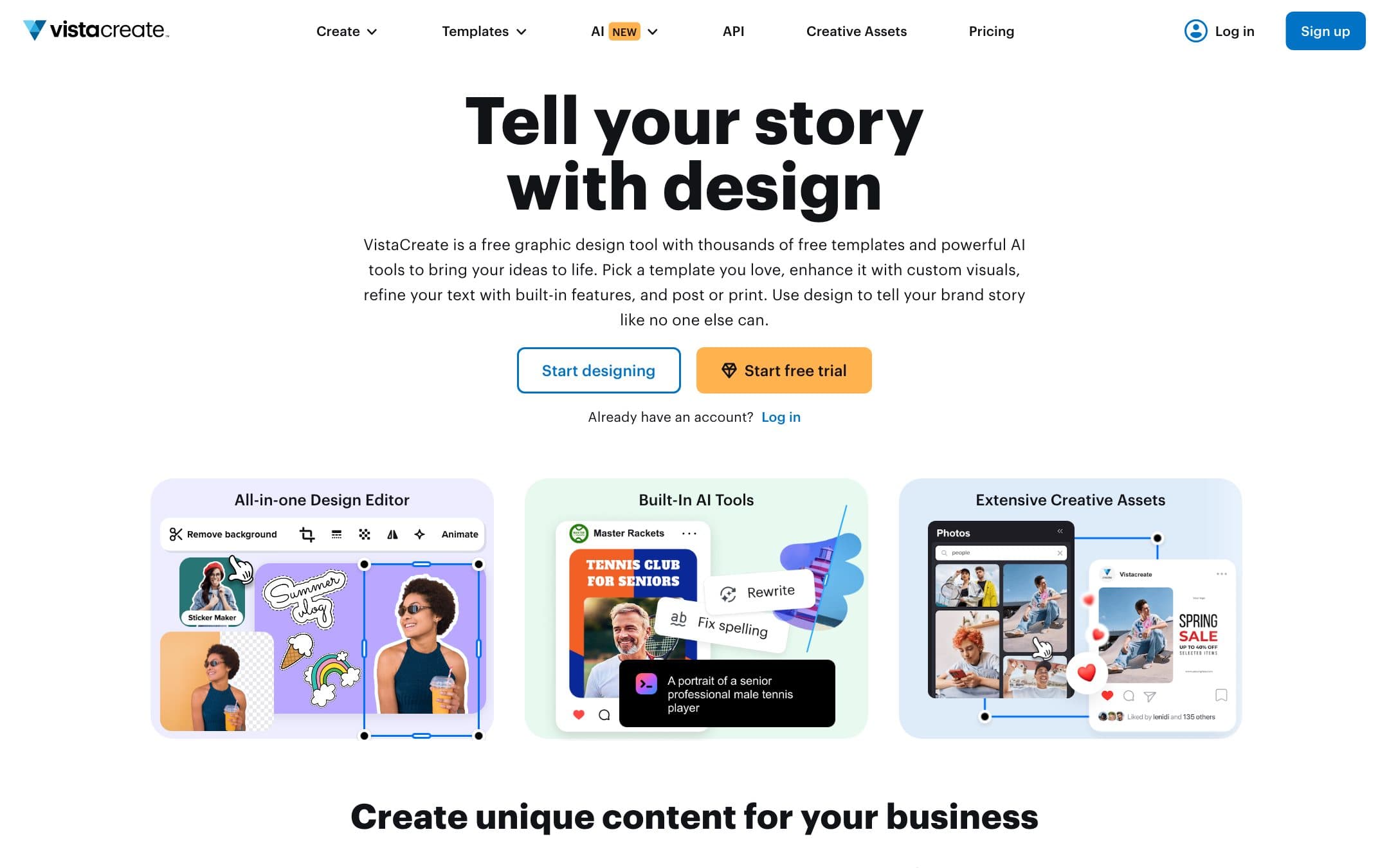
VistaCreate homepage with the headline "Tell your story with design"
The VistaCreate homepage as it looked on 1 September 2026.

How the 7.4 is built

Score breakdown for vistacreate, criteria set Software and apps
CriterionWeightScore
Capability

A solid template editor with a large asset library from Depositphotos behind it, and a narrower feature set than Canva or Visme in every direction except the seat count.

30%7.0
Usability

Close to Canva in shape and a step behind it in polish, which for this audience is the whole competition and a step is a lot.

20%8.0
Value

Ten dollars a month for up to ten seats is the best arithmetic on this page by a distance: a team of five pays $120 for twelve months in total, against $1,485 for five Visme Pro seats, and the merchandising allowance is generous.

20%9.5
Integrations

Thin next to Canva or Adobe, with the Vista print business as the obvious route out of the tool and not much else.

10%6.0
Support

A functional help centre that is silent on the two questions this category turns on, watermarks and export formats.

10%6.5
Trust

The lowest here, on one clause: an overdue balance suspends your right to use work already downloaded, and VistaCreate separately reserves the right to revoke any licence for any reason.

10%5.0
Weighted total100%7.4

Pros and cons

What works

  • Ten dollars a month covers up to ten seats rather than one
  • One standard licence with no extended tier and no per-design charge
  • Up to 500,000 hard copies for merchandising, and commissioned client work allowed
  • Commercial use granted at the free tier by the licence

What does not

  • An overdue account loses the right to use designs already downloaded
  • VistaCreate reserves the right to revoke or modify any licence for any reason
  • Nothing published about whether the free plan watermarks exports
  • Designs may not be used to create a logo, company name or trademark

What VistaCreate costs

From $10 per month · free tier available

VistaCreate pricing tiers
PlanMonthlyAnnual, per monthWhat you get
ProUp to 10 seats$10Ten dollars a month for up to ten seats, not per person · 200,000+ templates, 170M+ assets, unlimited brand kits and storage · The page says annual billing saves 23 percent and does not publish the total
Starter, free1 seat$0100,000 templates, 1M assets, 1 brand kit, 10 GB storage · Commercial use granted by the licence with no plan-level carve-out · Whether exports are watermarked is not stated anywhere we could find

The best per-seat arithmetic in this comparison and the harshest licence clause. Pro is $10 a month for up to ten seats, against $297 a year for one Visme seat on a qualifying plan. Annual billing is advertised as saving 23 percent and the total is not published, so the twelve month figure here is the monthly rate twelve times. The licence grants commercial use with no plan-level distinction, allows up to 500,000 hard copies for merchandising or advertising, and explicitly permits commissioned client work, all of which is more generous than Canva. Then this: "If your account becomes overdue, you shall lose rights to use the downloaded Design until the overdue balance is paid in full, and you must stop using the Design or any derivative work". No other vendor here claws back a licence to work already delivered over a billing failure. VistaCreate also reserves the right to revoke or modify any licence for any reason, and caps liability at $5,000. We could not establish whether the free plan watermarks exports.

Key specs

VistaCreate key specifications
Mobile app
Support channelsHelp centre
Commercial use on free planYes, the licence grants it with no plan-level carve-out
Watermark on free exportsNot stated on the plans page, the help centre or the licence
Cheapest qualifying planPro at $120 for twelve months at the monthly rate, or arguably the free plan
Stock licenceOne standard perpetual licence with no extended tier, capped at 500,000 hard copies
Usable in a logo or trademarkProhibited: designs may not be used to create an official logo, company name or trademark
Merchandise and print on demandPermitted up to 500,000 hard copies, and commissioned client work is explicitly allowed
Rights in AI outputStandard licence with lifelong personal or commercial rights. Individual AI files cannot be downloaded separately from the artboard
AI creditsNot published
What happens when you stop payingAn overdue account loses the right to use designs already downloaded until the balance is paid
Desktop appNot established

Who it is for

Best for

  • Small teams, where ten seats for ten dollars is unmatched here
  • Anyone printing at volume, where the 500,000 copy allowance is generous

Not for

  • Anyone who cannot tolerate a licence that can be suspended over an invoice
  • Logo work, which the licence excludes

In more detail

The best money on the page

Ten dollars a month, for up to ten seats.

Not per person. The whole plan. In a comparison where Visme charges $297 a year for one person to work commercially, VistaCreate Pro is $10 a month for a team of ten. Five seats here come to $120 for twelve months in total, against $1,485 for five Visme Pro seats, and no rival in our comparison has arithmetic like it.

The plans page says annual billing saves 23 percent and does not publish the total, so the twelve month figure here, $120, is the monthly rate twelve times and the real annual cost is lower.

VistaCreate scores 7.4 under how we rate, above two of our four picks, and it sits in the also-considered list anyway. The next section is why.

A licence that can be taken back

From the VistaCreate licence agreement:

"If your account becomes overdue, you shall lose rights to use the downloaded Design until the overdue balance is paid in full, and you must stop using the Design or any derivative work and take all necessary efforts to stop using them until the overdue balance is paid in full."

Read what that covers. Not future downloads. Work you already made, already downloaded, already printed, already put on a van. A failed card and the licence to the shopfront sign you installed last year is suspended until you settle up.

Nothing else in this comparison reaches backwards like that. Canva revokes rights only for a breach of the agreement. Visme applies a watermark going forward. VistaCreate is the only one that attaches your existing rights to a billing status.

Alongside it: "VistaCreate reserves the right to revoke or modify any license granted by this Agreement... for any reason." Liability is capped at five thousand dollars.

We are not saying VistaCreate does this. We are saying it has written down that it may, and that nobody else here has.

What the licence does allow, which is a lot

Now the other side, because the terms are otherwise the most generous in the set.

One licence, not one per design. A perpetual, worldwide licence to use files in a design, with no one-design-use tier and no extended licence to buy on top. Canva charges again every time you reuse a premium element.

Half a million hard copies, for personal use, merchandising, advertising or printing. Canva prohibits standalone use of content on print-on-demand goods entirely.

Commissioned client work is explicitly permitted, which is the thing a freelancer actually needs written down and which most vendors leave vague.

Commercial use at the free tier. The licence says content "is allowed to use for commercial and non-commercial purposes" with no plan-level carve-out.

AI output carries the same standard licence with lifelong commercial rights, with one quirk: individual generated files cannot be downloaded on their own, only as part of the artboard.

The question it will not answer

Whether the free plan watermarks your exports.

Not on the plans page, not in the help centre, not in the licence. For a category where the free tier is most people's starting point, and where our whole comparison anchors on the cheapest plan without a watermark, that is a real hole. Adobe Express, Piktochart, Snappa and Desygner leave the same one, which is five of the seven.

VistaCreate also draws the same line the rest of this category does on identity: a design may not be used to create an official logo, company name or trademark.

Who should buy it

Take Pro if you are a small team and the seat arithmetic is the deciding factor, which for five or ten people it should be. Nothing else here is close on price per person, and the merchandising and client work terms are better than Canva's.

Understand the overdue clause before you do, and keep the card current. That is not a throwaway line: it is the reason a tool that outscores two of our picks is not one of them.

Do not buy it if you cannot live with a licence that can be suspended over an invoice, and do not start on the free plan assuming your exports are clean, because VistaCreate has never said whether they are.

Prices, licence terms and the overdue clause on this page were read from the vendor plans page and licence agreements on . We did not test the products in this comparison.

Alternatives to VistaCreate

Where VistaCreate appears

VistaCreate questions

How much is VistaCreate?
Pro is $10 a month for up to ten seats. The plans page says annual billing saves 23 percent and does not publish the total, so the twelve month figure here is the monthly rate twelve times. There is a free Starter plan for one seat. Verified on 30 August 2026.
Can I use VistaCreate designs commercially on the free plan?
On the licence, yes. It states that "content on VistaCreate is allowed to use for commercial and non-commercial purposes" with no plan-level distinction. What we could not establish is whether free exports carry a watermark, and no vendor page addresses it.
What happens if I miss a payment?
This is the clause to read before subscribing. VistaCreate states that an overdue account loses the right to use designs already downloaded until the balance is paid, and that you must stop using the design and any derivative work. Nothing else in this comparison reaches back into work already delivered.
Can I sell merchandise made in VistaCreate?
Yes, up to 500,000 hard copies, which is the most generous merchandising allowance here. Canva prohibits standalone use of its content on print-on-demand products. What VistaCreate does not allow is using a design as an official logo, company name or trademark.

Ready to try VistaCreate?

Ten seats for ten dollars, and a licence that can be suspended over an unpaid bill.

Sources